How to Get Minecraft Ray Tracing on Windows & Xbox
by William Sanders
Minecraft ray tracing on Windows 10 and Xbox One is available exclusively through the Bedrock Edition beta program, and it requires an NVIDIA GeForce RTX-series graphics card on PC or enrollment via the Xbox Insider Hub on console. The feature replaces the game's standard rasterized lighting with physically simulated light paths that produce accurate shadows, reflections, and color bleeding across block surfaces.
For readers already familiar with the broader Windows software ecosystem — including tools and configuration guides covered in PalmGear's tech tips section — enabling ray tracing in Minecraft represents one of the most dramatic demonstrations of what modern GPU hardware can produce in a real-time game environment. What follows is a complete, factual breakdown of the technology, the hardware costs, the ideal use cases, and the mistakes that prevent the feature from activating correctly.

Contents
What Ray Tracing Is and How Minecraft Adopted the Technology
The Physics Behind Ray Tracing
Ray tracing is a rendering technique that simulates the physical behavior of light by tracing individual rays as they travel from a virtual camera, interact with surfaces, cast shadows, and reflect or refract across the scene. Unlike rasterization — the conventional real-time rendering method — ray tracing calculates how light from one surface bounces onto an adjacent surface, producing results that approximate physical reality rather than game-engine approximations.
In Minecraft's standard renderer, a torch illuminates nearby blocks according to fixed rules that ignore geometry entirely. Ray tracing replaces those rules with simulation: light leaking under a door behaves as physics demands, a lantern reflected in a still water pool produces a geometrically accurate mirror image, and sunlight filtering through stained glass casts colored shadows on the floor beneath it.

Minecraft's Bedrock Edition Beta Program
Microsoft and NVIDIA introduced ray tracing support for Minecraft Bedrock Edition through a phased beta rollout, representing a significant engineering effort to retrofit path tracing into a game originally designed without photorealistic rendering in mind. The feature is exclusive to Bedrock — sold through the Microsoft Store and the Xbox ecosystem — and is entirely absent from Minecraft Java Edition, regardless of shader mods or hardware.

On Windows 10, access requires enrollment in the Xbox Insider Hub beta program. On Xbox One, users reach the same program through the console's beta settings menu. Crucially, ray tracing only activates inside worlds that ship with compatible physically based rendering (PBR) resource packs — the rendering pipeline cannot operate on standard Minecraft textures, which contain no material data for reflectivity, emissivity, or surface roughness.
Pro Tip: Ray tracing in Minecraft only activates with a compatible RTX resource pack installed — loading a standard world without one produces no visual difference even on correctly enrolled RTX hardware.
When Ray Tracing Delivers Results — and When It Falls Short
Best Use Cases for Enabling Ray Tracing
Ray tracing produces its most compelling results in environments where lighting complexity is deliberately engineered. Players constructing interior spaces with multiple light sources — lanterns, glowstone, sea lanterns, and fire — will see the most dramatic improvement, because ray tracing calculates how each source contributes independently to surface illumination across every frame.

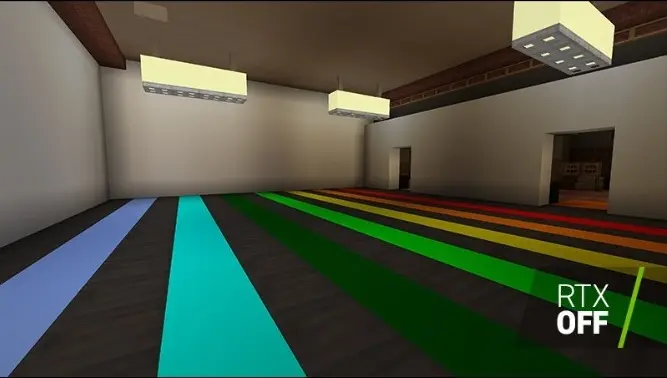


Recommended scenarios for enabling ray tracing include:
- Interior builds with deliberate lighting design, where ambient occlusion and shadow casting are architecturally visible
- Water-heavy environments where reflections and refractions create visual depth unavailable in standard rendering
- Official RTX showcase worlds released through the Minecraft Marketplace by Mojang and NVIDIA partners
- Screenshots and recorded content where visual fidelity takes priority over sustained frame rate
Just as users evaluating software options for Windows — such as those reviewing Microsoft Office alternatives or configuring WhatsApp on a Windows PC — need to match the tool to the hardware and workflow before committing, Minecraft ray tracing demands an honest assessment of GPU tier and intended use before the feature is switched on permanently.
Situations Where Ray Tracing Costs More Than It Returns
Survival mode players who prioritize frame rate and responsiveness will find the performance penalty prohibitive on mid-tier RTX hardware without DLSS enabled. Open outdoor biomes — forests, plains, and ocean surfaces under natural daylight — benefit measurably less than enclosed interiors, because the complex multi-bounce lighting interactions that make ray tracing visually distinct are less present in open terrain with a single dominant light source.
On Xbox One hardware, the constraint is more severe: Microsoft's console implementation limits ray tracing to lower internal resolutions and reduced ray counts compared to a purpose-built PC, producing a result that is visually improved over standard rendering but noticeably softer than the same setting on an RTX 3070 or above. Competitive players who require consistent 60 fps or higher should leave ray tracing disabled regardless of platform.
Hardware Costs and System Requirements
NVIDIA RTX Card Pricing Overview
Minecraft ray tracing on Windows 10 requires an NVIDIA GeForce RTX card — no other GPU vendor or generation supports the feature. AMD Radeon cards, Intel Arc discrete graphics, and all NVIDIA GTX-series cards are incompatible with Minecraft's RTX rendering pipeline regardless of driver version or system configuration.
| GPU Tier | Example Card | Approx. Price | Ray Tracing Performance (Est.) |
|---|---|---|---|
| Entry RTX | RTX 3060 | $299–$349 | 30–45 fps at 1080p with DLSS enabled |
| Mid-Range RTX | RTX 3070 | $449–$549 | 55–70 fps at 1080p with DLSS enabled |
| High-End RTX | RTX 4080 | $999–$1,199 | 90+ fps at 1440p with DLSS enabled |
| Xbox One (Console) | Built-in hardware | No upgrade path | Variable; resolution-limited by platform |
Total Cost of Entry for a Ray Tracing Build
Beyond the GPU itself, a Windows 10 system purpose-built for Minecraft ray tracing requires a modern CPU to avoid bottlenecking the RTX card during ray calculation, 16 GB of RAM at minimum (32 GB recommended for smooth sustained performance), and a display that outputs at the resolution where ray tracing's advantages are perceptually distinct from standard rendering. The realistic minimum budget for a complete desktop build targeting ray tracing sits between $900 and $1,300, depending on whether components are purchased new or sourced from the secondary market.
Setup Mistakes That Block Minecraft Ray Tracing on Windows 10 from Activating
Beta Enrollment and Compatibility Errors
The most common reason ray tracing fails to activate is incomplete or incorrect beta enrollment. On Windows 10, the Xbox Insider Hub application must be installed from the Microsoft Store, and the user must navigate specifically to Insider Content, select Minecraft Beta, and click Join — joining a different Insider tier or skipping the Hub entirely will not unlock ray tracing functionality in the installed game.


The correct enrollment sequence on Windows 10 proceeds as follows:
- Download Xbox Insider Hub from the Microsoft Store and sign in with the Microsoft account linked to the Minecraft Bedrock purchase
- Navigate to Insider Content within the Hub, then select Minecraft Beta from the available programs
- Click Join and allow the Microsoft Store to download and install the beta build, which replaces the standard Minecraft installation
- Launch Minecraft after installation completes and confirm the version number displays a beta designation in the main menu
In-Game Settings That Override Ray Tracing
Even after correct beta enrollment, ray tracing frequently remains inactive because users do not manually enable the DirectX Ray Tracing toggle under Video Settings — the feature does not activate automatically upon beta installation and must be switched on explicitly inside the game. Loading a world without an active RTX-compatible resource pack also produces no visual change, even on a properly enrolled and configured system with a supported RTX card installed.


Warning: Running ray tracing on any non-RTX GPU — including GTX 1080 Ti or AMD RX 6800 XT — will either crash the game on launch or silently fall back to standard rendering with no error message displayed.
Outdated NVIDIA drivers represent a secondary but common blocking issue: the RTX rendering pipeline in Minecraft requires driver versions released after the beta program launch, and systems that have not updated drivers since purchasing the GPU may find ray tracing unavailable despite correct enrollment. The same systematic verification principle that applies to hardware troubleshooting — confirming component functionality before diagnosing software — applies here directly. PalmGear's guides on testing power and hardware equipment and securing hardware installations reflect the same methodology: verify the foundation before investigating the application layer.
Frequently Asked Questions
Does Minecraft ray tracing work on all Windows 10 PCs?
No. Minecraft ray tracing on Windows 10 requires an NVIDIA GeForce RTX-series graphics card. PCs with AMD Radeon graphics, Intel integrated graphics, or NVIDIA GTX-series cards cannot enable ray tracing in Minecraft regardless of other system specifications or driver versions.
Is Minecraft ray tracing available in the Java Edition?
Ray tracing is not available in Java Edition. The feature is exclusive to Minecraft Bedrock Edition, sold through the Microsoft Store and available on Xbox One. Third-party shader mods for Java Edition can simulate some lighting effects visually, but they do not use hardware-accelerated RTX path tracing and are not the same technology.
Will joining the Minecraft beta permanently replace the standard installation?
Joining the Minecraft Beta through Xbox Insider Hub replaces the standard Bedrock installation with the beta build. Users can exit the beta program at any time through the Hub, which reverts the game to the standard retail version. World save data is generally preserved through this transition, though Microsoft recommends backing up saves before switching builds.
What resource packs are compatible with Minecraft ray tracing?
Ray tracing requires resource packs that include physically based rendering textures providing material data for reflectivity, emissivity, and surface roughness. Mojang and NVIDIA have released several free RTX-compatible worlds through the Minecraft Marketplace specifically designed for this purpose. Standard community resource packs without PBR data will not activate ray tracing even in a fully configured beta environment.
Next Steps
- Confirm that the installed version of Minecraft is Bedrock Edition from the Microsoft Store — Java Edition users must purchase Bedrock separately, as the two are distinct products with no cross-compatibility for ray tracing.
- Install Xbox Insider Hub from the Microsoft Store, sign in with the Microsoft account linked to the Minecraft purchase, navigate to Insider Content, and join the Minecraft Beta program specifically.
- Download at least one free RTX-compatible world or resource pack from the Minecraft Marketplace — without PBR textures active, ray tracing cannot initialize regardless of hardware or settings configuration.
- After launching the beta, open Video Settings and manually enable the DirectX Ray Tracing toggle, then enable DLSS to recover frame rate on mid-range RTX 3060 or 3070 hardware.
- Update NVIDIA drivers to the latest available release through GeForce Experience or the NVIDIA website before troubleshooting any ray tracing activation issues, as outdated drivers block the RTX pipeline from initializing in Minecraft's beta build.


About William Sanders
William Sanders is a former network systems administrator who spent over a decade managing IT infrastructure for a mid-sized logistics company in San Diego before moving into full-time gear writing. His years in IT gave him deep hands-on experience with networking equipment, routers, modems, printers, and scanners — the kind of hardware most reviewers only encounter through spec sheets. He also has a long background in consumer electronics, with a particular focus on home audio and video setups. At PalmGear, he covers networking gear, printers and scanners, audio and video equipment, and tech troubleshooting guides.
You can get FREE Gifts. Or latest Free phones here.
Disable Ad block to reveal all the info. Once done, hit a button below